Know exactly what to say on every sales call.
Magbenta AI listens to both sides of your call and quietly shows you the next line, the right question and the answer to every objection, on a private overlay only you can see. When you hang up, your notes, score and follow-up email are already written.
Windows 10 & 11. No bot joins your call. Set up in about 30 minutes.
- Zoom
- Google Meet
- Microsoft Teams
- RingCentral
- Google Voice
- Dialers & softphones
Great reps lose deals in the moments they don't have an answer.
The objection you didn't see coming. The question you forgot to ask. The hour of notes after every call. Magbenta AI is built for exactly those moments.
You freeze on objections
"It costs too much." "I need to think about it." "We already have someone." The right answer comes to you an hour after the call ends.
Key questions get skipped
Who else decides? What's the timeline? What's the budget? Miss one, and the deal stalls on a follow-up you could have avoided.
Admin eats your selling time
Notes, CRM updates, follow-up emails and next steps. Every call creates another round of typing instead of another conversation.
From "hello" to follow-up email, handled.
Magbenta AI runs on your Windows PC next to the call app you already use. Nothing joins the meeting and nothing changes for your prospect.
Teach it what you sell
Answer a few questions and the AI writes your playbook: offer, pricing, ideal customer and the objections you hear. Add your script, checklists and price sheets.
Start your call
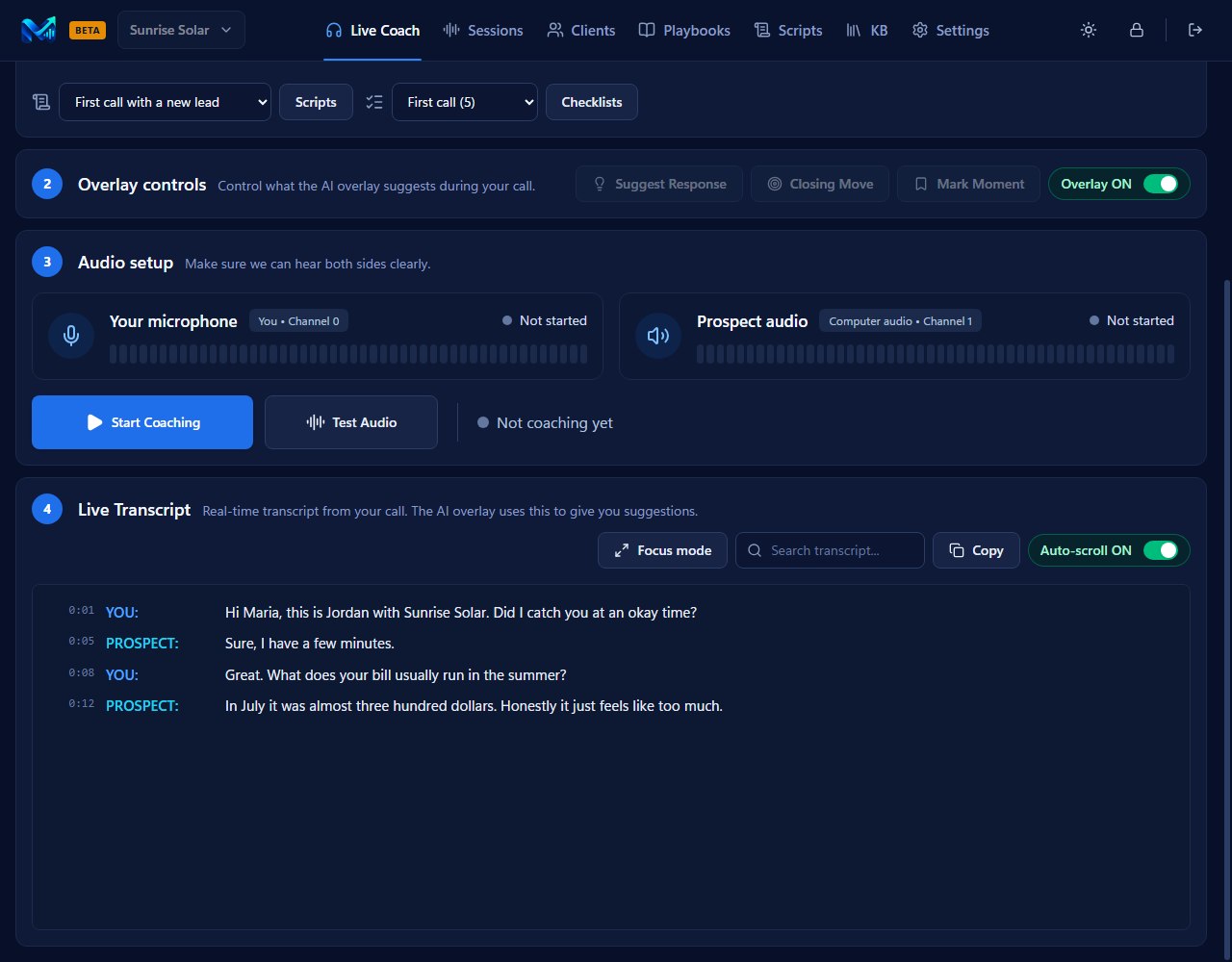
Pick the client, press Start Coaching and take the call as usual. Your mic and the prospect's audio are transcribed separately, so it always knows who said what.
Get coached live
When the prospect finishes talking, a short, natural suggestion appears on your private overlay: what to say, what to ask, and when to go for the close.
Hang up to a finished report
Summary, a score with what to do better, objections, answers to your checklist, next steps and a ready-to-send follow-up email. Export it or sync it to your CRM.
Everything a top closer knows, on your screen when you need it.
The right words, the moment you need them.
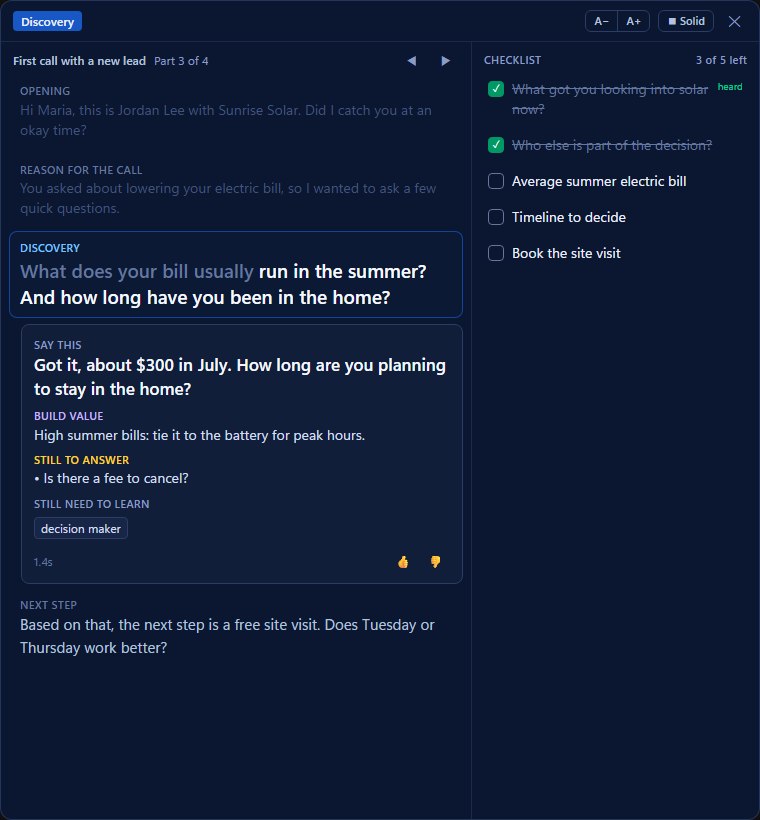
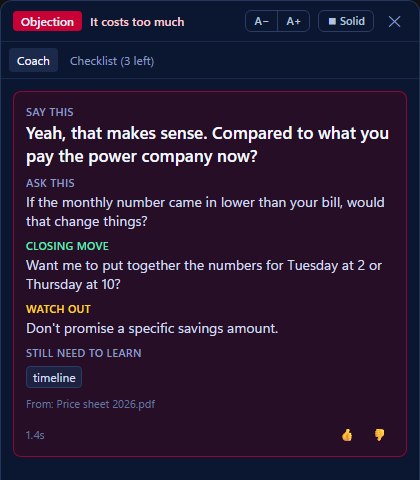
A small window floats over your call that only you can see. The moment your prospect finishes their thought, Magbenta AI suggests what to say, in plain words you'd actually use.
- Say this, Ask this, Closing move, Watch out: one glance tells you your next move.
- Answers objections using your own playbook, price sheets and documents, and shows which file it used.
- Waits for the prospect to finish talking, keeps lines short (about 20 words), and leaves each card up long enough to read.
- Tracks questions the prospect asked that you haven't answered yet, and what you still need to learn.
- Ask on demand with one click or a hotkey: Suggest Response, Closing Move, Mark Moment.
- Make it yours: see-through or solid background, bigger or smaller text, drag it anywhere.
Your script follows you. Your checklist ticks itself.
Load your sales script and it scrolls along as you talk, highlighting the part you're on, with live coaching right underneath. No tab switching, no losing your place.
- Import Word, PDF, text or Markdown scripts, or have the AI write one from your playbook.
- Fills in the prospect's first name, company and your name automatically.
- Call checklists for first calls, follow-ups and more. Items tick off on their own when they're covered.
- The prospect's answers to each checklist item land in your call summary.
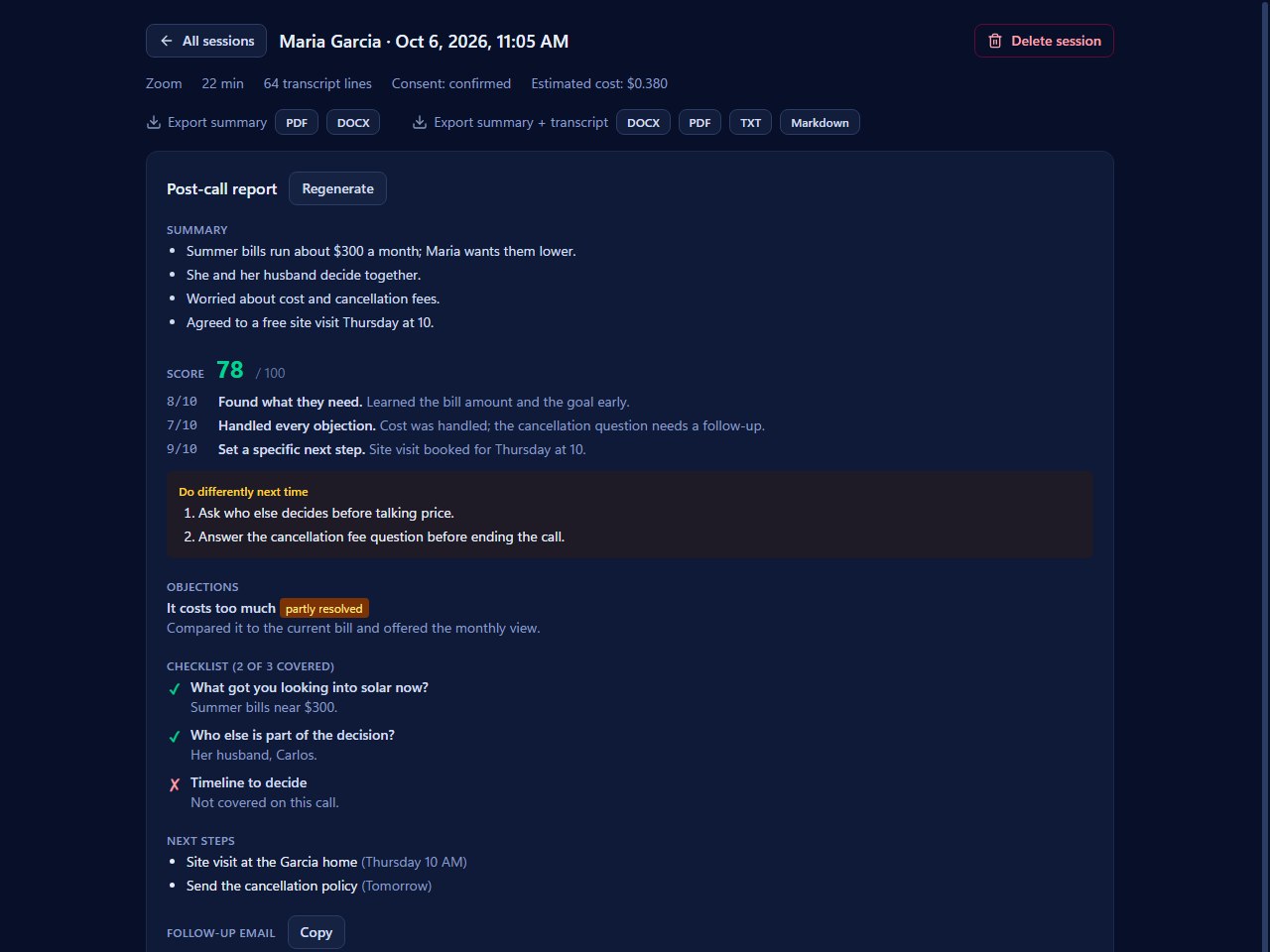
Hang up. Your notes are already done.
Moments after the call, Magbenta AI hands you a complete write-up, plus honest coaching on how to win the next one.
- Summary, objections (and whether you resolved them), next steps with dates.
- A call score out of 100 with a clear breakdown and two things to do differently next time.
- A follow-up email written in your voice and signed with your name, ready to copy.
- Script adherence: which parts of your script you skipped.
- Lessons for your playbook: new objections, better answers and closing moves that worked, added with one click.
- Export to PDF, Word, text or Markdown, with or without the full transcript.
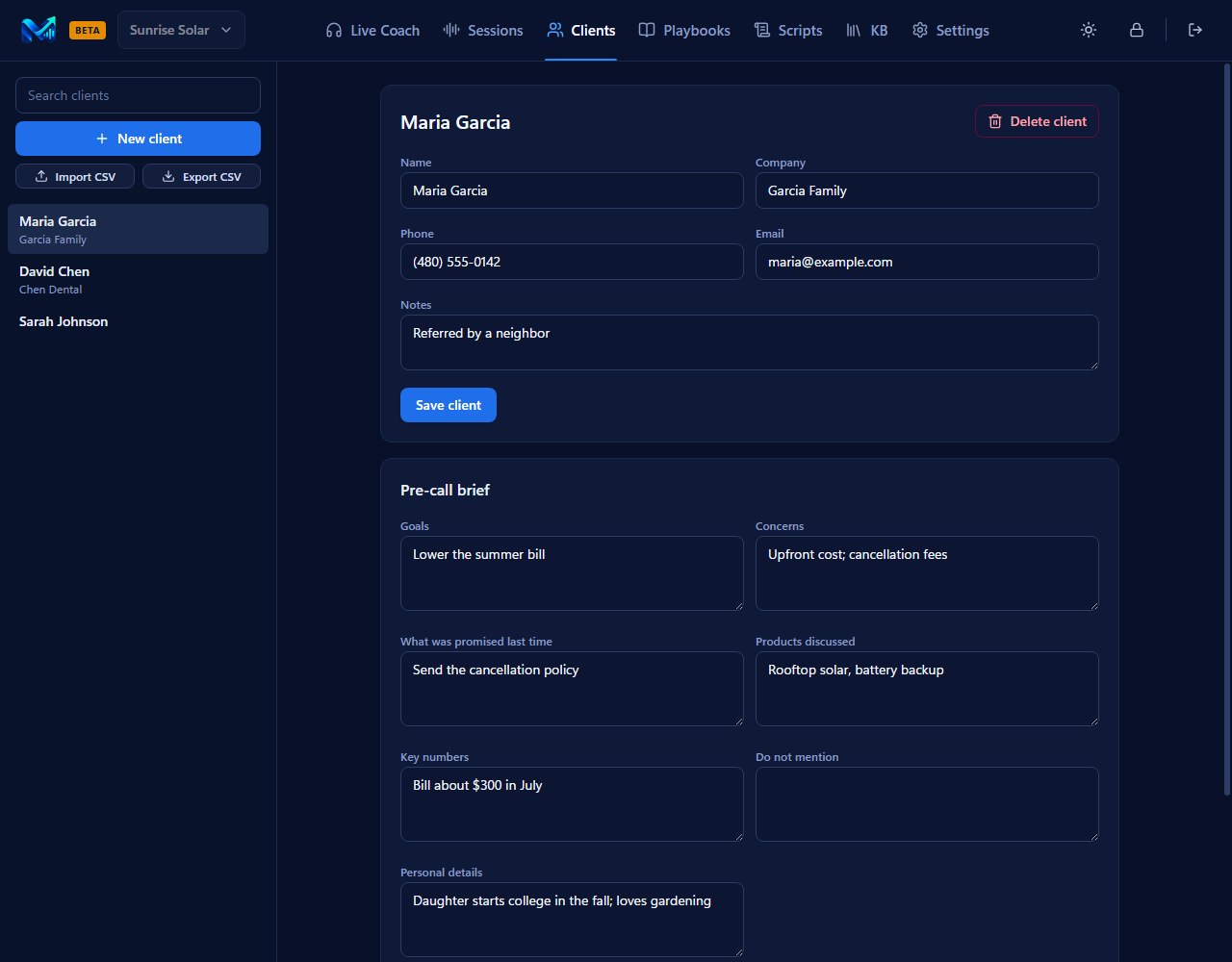
Every call picks up right where the last one left off.
Pick the client before the call and the AI already knows their goals, concerns, what you promised last time and what they told you on their last five calls.
- A pre-call brief per client that updates itself from each report (you approve every change).
- Remembers the small talk, like a daughter starting college or a love of gardening, and helps you use it to build rapport and tie the close to what matters to them.
- "Do not mention" notes keep you away from sore spots.
- Import and export clients by CSV.
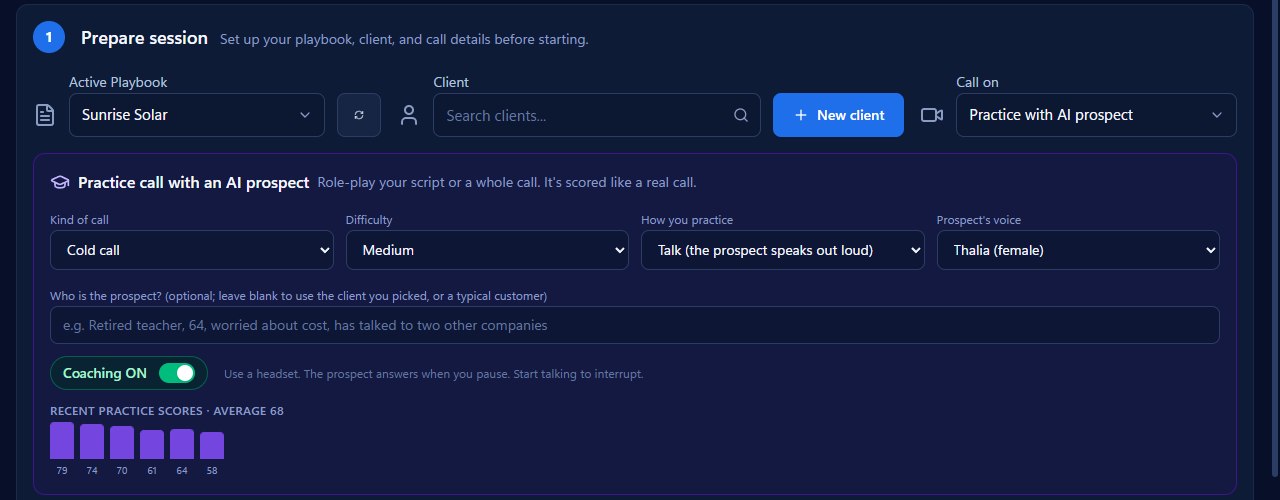
Practice on an AI prospect before you practice on a real one.
Role-play a whole call against a realistic AI prospect built from your own playbook. Talk out loud and it answers in a natural voice, or type if you're somewhere quiet. When you're done, you get the same score and coaching as a real call.
- Five scenarios: cold call, inbound lead, follow-up, objection-heavy, and ready to buy.
- Easy, medium or hard prospects that push back like real people.
- Describe the prospect yourself, or practice against one of your real clients before the big call.
- Turn coaching on to learn, or off to test yourself, and watch your scores climb.
- Practice calls are kept separate and never change your real client notes.
The more you sell with it, the better it coaches you.
Every call teaches Magbenta AI something about your prospects, your style and what closes. You approve what it keeps, so it only ever learns what you want it to.
Lessons for your playbook
After each call, it spots objections your playbook doesn't cover yet, answers that worked better than the old ones, and closing moves that got a yes. One click adds them, and the next call's coaching uses them.
Learns your style
Give suggestions a thumbs up or down. Magbenta AI leans toward the kind of lines you like to say and stops offering the ones you don't, so it sounds more like you every week.
Remembers every client
Goals, concerns, promises, key numbers and the small talk from the last five calls carry into the next one, so you never start from zero with a prospect again.
Your calls are never used to train AI models. What it learns lives in your own playbook and client notes, where you can see and edit it.
Built for people who sell for a living.
AI playbook builder
Answer a few questions and get a complete playbook: offer, pricing, ideal customer, objections and how to answer them. Keep several per business.
Knowledge base
Drop in price sheets, FAQs and product docs (Word, PDF, text). The AI looks things up during the call and tells you where the answer came from.
Group calls
Two or three people on the other side? Each speaker is labeled separately so suggestions answer the right person.
Multiple businesses
Sell for more than one company? Each gets its own playbooks, scripts, clients, calls and color theme. Switch in one click.
GoHighLevel sync
Send call summaries, next steps as tasks, follow-up emails and transcripts to your GoHighLevel contacts automatically.
More CRMs on the way
Connections to Salesforce, HubSpot, Zoho CRM and monday CRM are being worked on: call summaries as notes and next steps as tasks, on the right contact.
Ask AI about your calls
Search every call you've had, or just ask: "What did the Garcias say about financing?" and get the answer with the call it came from.
Cost tracking & budget
See exactly what each call cost in AI and transcription, and set a monthly budget so there are never surprises.
Your choice of AI
Use Anthropic's Claude or OpenAI's ChatGPT. Fast models for live coaching, smarter ones for reports.
Client portal
Everything syncs to your private web portal. Review calls, prep a client or fix a script from any browser, and the app picks up your changes.
If you sell on the phone or on video, it's for you.
Your playbook, your script and your documents decide what it says, so it fits whatever you sell.
- Solar & home services
- Insurance
- Real estate
- Mortgage & lending
- Marketing agencies
- SaaS & software
- Financial services
- Coaching & consulting
- B2B sales teams
- Appointment setters
- Founders who sell
Your calls stay yours.
Your private client portal
Your calls, clients and notes live on your PC and in your own password-protected client portal, so you can review and edit them from any browser. Only you can sign in, and you can delete anything whenever you want.
Your own AI accounts
You connect your own Deepgram and Anthropic (or OpenAI) accounts. Audio and text go straight from your PC to them, and your API keys are encrypted by Windows.
No bot on your call
Magbenta AI listens through your own computer's audio. No "notetaker" joins the meeting, and the overlay is visible only on your screen.
Consent reminders built in
Before each call, a reminder helps you get the other person's permission to transcribe, as recording laws in many places require.
Be one of the first to sell with Magbenta AI.
Magbenta AI is now open to beta testers. Use the full app free, and help shape what comes next.
Every feature on this page is included. You only pay Deepgram and Anthropic (or OpenAI) directly for what you use, and a 30-minute call usually costs well under a dollar. The app shows your spending as you go.
- Your license key the moment you sign up
- The installer plus step-by-step installation and user guides
- Direct line to the team at support@magbentaai.com
- Your feedback shapes the features we build next
What you need
- A Windows 10 or 11 PC64-bit, about 500 MB free, and an internet connection.
- A headsetStrongly recommended, so your mic only hears you.
- A Deepgram accountFor live transcription. New accounts start with free credit.
- An Anthropic or OpenAI accountFor the AI coaching. A few dollars of credit goes a long way.
- About 30 minutesThe installation guide walks you through every click, including getting your keys.
Questions, answered.
Is it really free?
Yes. The Magbenta AI software is free during the beta. It uses your own accounts with Deepgram (transcription) and Anthropic or OpenAI (the AI), and you pay them directly for what you use. For a typical 30-minute call that's usually well under a dollar, and the app tracks it for you and can warn you at a monthly budget.
Can the prospect see or hear Magbenta AI?
No. Nothing joins your meeting. The app listens through your own computer's microphone and speakers, and the overlay is a window on your screen only. If you share your screen, share just the call or presentation window rather than your whole desktop.
Which call apps does it work with?
Anything that plays the call through your Windows PC: Zoom, Google Meet, Microsoft Teams, RingCentral, Google Voice, browser-based dialers and softphones. If you can hear the prospect through your computer, Magbenta AI can too.
Does it work on Mac or on my phone?
Not yet. The beta is for Windows 10 and 11. For phone calls, take them through a computer app like Google Voice, RingCentral or your dialer.
Which CRMs does it work with?
Today it syncs with GoHighLevel: clients, call summaries, next steps as tasks, follow-up emails and transcripts. Connections to Salesforce, HubSpot, Zoho CRM and monday CRM are being worked on. Tell us which one you use when you sign up, and we'll let you know when it's ready.
Does it get better the more I use it?
Yes. After every call it suggests lessons for your playbook: new objections it heard, answers that worked and closing moves that got a yes. You choose what to add. Your thumbs up and down on suggestions steer its style toward yours, and client memory means each call builds on the last. None of it trains an AI model on your calls; it all lives in your own playbook and notes.
Will it sound like me, or like a robot?
Suggestions are deliberately short and conversational (about 20 words), use plain language and contractions, and are built from your own playbook and script. You stay in control of what you say: think of it as a sharp sales manager whispering in your ear.
Do I need my own sales script?
No. It coaches you with or without one. If you have a script, import it from Word, PDF or text. If you don't, the AI can write one from your playbook in a couple of minutes, and the playbook itself is created by answering a few questions.
Where is my data stored?
On your computer, with a synced copy in your private client portal at magbentaai.com, so you can review calls and edit clients, scripts, checklists, playbooks and settings from any browser. Audio is never stored: while you use the app it's streamed to Deepgram for the transcript, and text goes to Anthropic or OpenAI for suggestions. Your API keys never leave your computer. Optional GoHighLevel sync sends call summaries to your own CRM account. We never sell your data or use it to train AI.
Can I see my calls on my phone or another computer?
Yes. Everything syncs to your private client portal at magbentaai.com/clients. Sign in from any browser to review sessions and reports, update clients before a meeting, or edit your scripts, checklists, playbooks and settings. Changes reach the app within a minute, and you choose what syncs: turn off any category in the app's settings and it's removed from the portal. Live coaching and practice calls run in the Windows app.
Is it legal to transcribe my calls?
Recording and transcription laws differ by state and country, and some require everyone on the call to agree. Magbenta AI reminds you to get consent before every call; it's your responsibility to follow the laws where you and your prospect are.
Do I need to be technical to set it up?
No. If you can install an app and copy and paste, you can set it up. You get a step-by-step installation guide with screenshots right after you sign up, including exactly where to click to create your API keys.
What happens when the beta ends?
Your beta key works until the date shown when you sign up. We'll email beta testers well before anything changes, and your calls and notes stay on your computer either way. We'll also tell you before the portal copy is removed.
Your next call could be your best one.
Sign up in a minute, get your license key and the download instantly, and walk into your next call knowing exactly what to say.
Free during the beta. Windows 10 & 11.